Streaming Audio files (that show up in a black box) cannot be downloaded, as they are flash objects set to only run from your browser.
The MP3 files, on the other hand, ...
más...
Streaming Audio files (that show up in a black box) cannot be downloaded, as they are flash objects set to only run from your browser.
The MP3 files, on the other hand, can be played online or downloaded. These files list the Name, Size and Modified (Date) of the files, which all end in .mp3. Depending on how your computer is configured, and which audio player is your default, clicking on these types of files will either:
a) Give you the option to Open or Save the file (Open would then play the file with your default audio player)
-or-
b) Automatically play the file in your default audio player
If you would like to download the file, or are having problems playing the file online, right-click on the link and select Save Target As..., choose a location and then Save the file. Then locate the file on your computer (where you saved it) and open it.

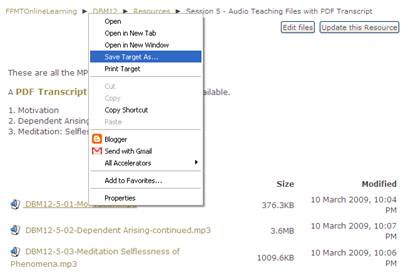 Save_Target_As.bmp
