
Tips for playing MP3 audio in Discovering Buddhism courses - From Brad Ackroyd
For any of the .mp3 audio files, since they load in a player on your local computer (Windows ...
Tips for playing MP3 audio in Discovering Buddhism courses - From Brad Ackroyd
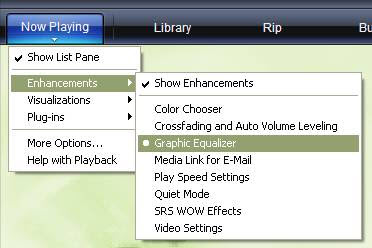
For any of the .mp3 audio files, since they load in a player on your local computer (Windows Media Player, iTunes, etc.) you can tweak the equalizer settings a little bit which may help a little bit. For example, in Windows Media Player, you can Click Now Playing or View > Enhancements > Graphic Equalizer:
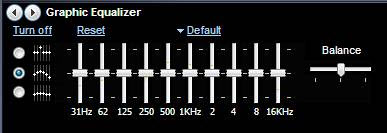
This opens a bottom window with the EQ settings:
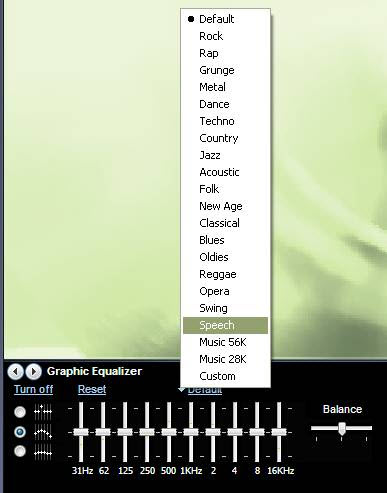
By clicking on the Default option, you can select Speech:
You will notice that the Speech profile slightly lowers the highest and lowest frequencies, which helps to lower background ambient noises and highlight the speakers voice, which is primarily in the 1-2KHz range.
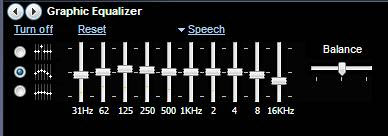
You can further exaggerate this by manually pulling down the 31Hz and 16KHz bars, and pulling up the 1 KHz bar:
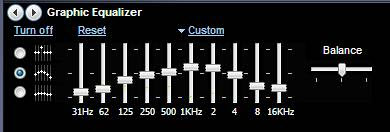
Although the audio quality has not been improved, by playing with the EQ settings you should be able to minimize background noise and ambience, and focus the audio on the specific range of the speakers voice, which should improve the listening experience.
Brad
